
PCBugLab PCBugLab
  • Home
  • How-to guides
    How-to guidesShow More: How-to guides
    windows-error-0x80080005-pcbuglab
    How to fix Windows Update error 0x80080005
    7 Min Read
    update-service-disabled-featured-pcbuglab
    How to fix Windows error 0x80070422
    Windows Update error 0x80240034 download failure illustration-pcbuglab
    How to fix Windows error 0x80240034
    7 Min Read
    Windows error 0x8024402c - pcbuglab
    How to fix Windows error 0x8024402c
    8 Min Read
    windows-update-error-0x800705b4-featured-pcbuglab
    How to fix Windows Update error 0x800705b4
    7 Min Read
  • Tech news
    Tech newsShow More: Tech news
    Acer Predator Atlas 8 handheld with its screen, joysticks and front controls
    Acer Predator Atlas 8: New handheld costs $1,299.99
    4 Min Read
    apple-airtag-4-pack-amazon-deal-pcbuglab
    AirTag 4-pack deal: the big price drop you need to know
    3 Min Read
    rtx-5090-featured-pcbuglab
    RTX 5090 shipment worth $470,000 vanishes at airport
    4 Min Read
    Xbox Ally X20 vs Xbox Ally X - PCBUGLAB
    Xbox Ally X20 vs Xbox Ally X: Is the upgrade worth it?
    5 Min Read
    Super Nt Plus - Mega SG - PCBUGLAB
    Analogue Super Nt Plus and Mega Sg Plus bring retro upgrades
    4 Min Read
  • Gaming news
    Gaming newsShow More: Gaming news
    gta6-cyberleek-pcbuglab
    Cyberleek claims GTA 6 Xbox leak playable for PC
    5 Min Read
  • Cybersecurity
    CybersecurityShow More: Cybersecurity
    cPGuard update attack - pcbuglab
    cPGuard update attack plants backdoors on Linux servers
    2 Min Read
    Gorbag WinRAR attacks - pcbuglab
    New Gorbag WinRAR attacks target Ukraine’s sensitive data
    3 Min Read
    Chinese hackers launch ARTEX AI attacks-pcbuglab
    Chinese hackers launch ARTEX AI attacks on 200+ organizations
    3 Min Read
    BTCPay Server flaw exploit - pcbuglab
    BTCPay Server flaw exploit lets hackers steal Bitcoin and Litecoin
    3 Min Read
    Chrome-extension-search-hijacking-pcbuglab
    Chrome extension search hijacking: what you need to know now
    4 Min Read
  • Contact
Reading: How to download Windows 11 for an ARM-Based PC
Share
PCBugLabPCBugLab
Font ResizerAa
  • Home
  • Cybersecurity
  • Tech news
  • How-to guides
  • Hardware
Search
  • Home
  • Cybersecurity
  • Tech news
  • How-to guides
  • Hardware
Follow US
PCBugLab > How-to guides > How to download Windows 11 for an ARM-Based PC
How-to guides

How to download Windows 11 for an ARM-Based PC

buglab
By
buglab
Last updated: October 21, 2026
5 Min Read
win-11-arm-based-pc-pcbuglab-featured
SHARE

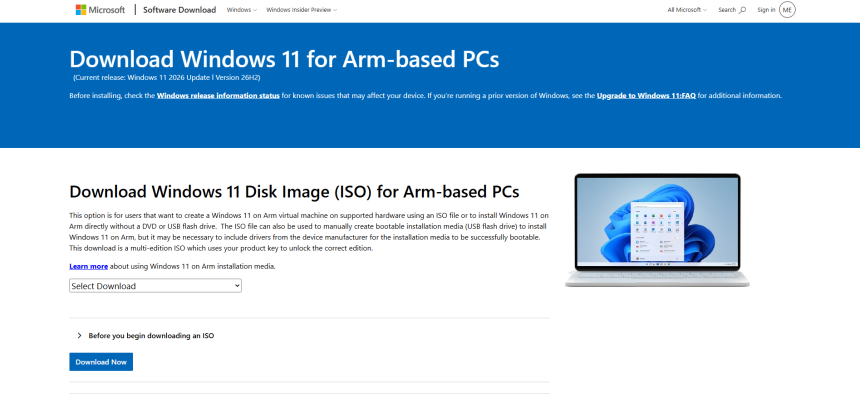
You can download Windows 11 for an ARM-based PC directly from Microsoft using its official Arm64 ISO download page. This installation file is intended for compatible ARM devices, including supported Snapdragon-powered Windows PCs.

Contents
  • Check whether your PC uses an ARM processor
  • Download Windows 11 for an ARM-based PC
  • Check device drivers before installing
  • Install from the ISO while Windows is running
  • Can you create a Windows 11 ARM USB installer?
  • Check app and accessory compatibility

Before downloading, check your computer’s architecture and your manufacturer’s installation guidance. Choosing the correct ISO is only part of the process, because some ARM devices also need specific drivers to start the installer or work properly afterward.

Check whether your PC uses an ARM processor

On your Windows PC, open Settings → System → About and look under Device specifications → System type.

An ARM device should identify its processor as ARM-based. You can also search for System Information and check System Type.

If your computer reports an x64-based processor, use Microsoft’s standard x64 Windows 11 download instead. The Arm64 ISO is a separate installation image for a different processor architecture.

Download Windows 11 for an ARM-based PC

Open the official Windows 11 Arm64 download page.

Follow these steps:

  1. Find Download Windows 11 Disk Image (ISO) for Arm-based PCs.
  2. Select the available Windows 11 download from the menu.
  3. Click Download Now.
  4. Choose your product language.
  5. Click Confirm.
  6. Select the download link and save the ISO.

Choose the same Windows display language if you intend to upgrade your existing installation. Microsoft’s generated download links are valid for 24 hours, so create a new link if yours expires.

Check device drivers before installing

An ARM processor does not guarantee that a generic ISO will install successfully on every device.

Microsoft explains that Snapdragon X Series devices can boot its ARM installation media without additional manufacturer drivers. However, more drivers may still be required after installation for full functionality.

Earlier Snapdragon devices can require manufacturer drivers to be integrated into the installation image before it will boot.

Check your manufacturer’s support page for your exact model. If a recovery image is available, it can provide a more suitable route for restoring a device with its required drivers.

Install from the ISO while Windows is running

If your compatible ARM PC already starts normally, you may be able to begin installation without creating a USB drive.

Back up important files first, then:

  1. Locate the downloaded ISO in File Explorer.
  2. Right-click it and select Mount.
  3. Open the virtual drive.
  4. Run setup.exe.
  5. Follow Windows Setup.

Review the final installation summary carefully. If you want to preserve your applications and files, proceed only when Setup explicitly offers Keep personal files and apps. Stop and investigate if that option is unavailable.

Running Setup from Windows and booting from installation media are different installation paths. Booting from media is used for a fresh installation and can remove existing data.

Can you create a Windows 11 ARM USB installer?

Yes, but Microsoft’s Media Creation Tool does not currently create Arm64 installation media.

You need an ARM-compatible media creation method and any drivers required by your particular device. Follow your manufacturer’s instructions rather than assuming an x64 USB installation guide applies.

Simply copying the ISO file onto a USB drive does not automatically make it bootable. If your goal is to recover a PC that no longer starts, check the manufacturer’s recovery options before preparing generic installation media.

Check app and accessory compatibility

Before replacing your current installation, check the software and accessories you depend on.

Windows 11 on ARM can run many applications, but hardware drivers must support ARM. App emulation does not make an incompatible driver work.

Pay particular attention to:

  • Printers and specialist USB accessories.
  • VPN and third-party security software.
  • Games that depend on anti-cheat drivers.
  • Professional applications with driver-based components.

Check compatibility with the software publisher or hardware manufacturer before installing. This is especially useful for work PCs where one unsupported application could interrupt your daily tasks.
TAGGED:ARM-Based PCArm64 ISOWindows 11

Sign Up For Daily Newsletter

Be keep up! Get the latest breaking news delivered straight to your inbox.
By signing up, you agree to our Terms of Use and acknowledge the data practices in our Privacy Policy. You may unsubscribe at any time.
Share This Article
Facebook Copy Link Print
Previous Article error-page-fault-in-nonpaged-area-featured-pcbuglab How to fix Page Fault In Nonpaged Area
Next Article win-11-pcbuglab-featured How to download Windows 11 in a different language
Leave a review

Leave a Review Cancel reply

Your email address will not be published. Required fields are marked *

Please select a rating!

FacebookLike
InstagramFollow

Subscribe Now

Subscribe to our newsletter to get our newest articles instantly!
Most Popular
gta6-cyberleek-pcbuglab
Cyberleek claims GTA 6 Xbox leak playable for PC
November 23, 2026
windows-error-0x80080005-pcbuglab
How to fix Windows Update error 0x80080005
November 18, 2026
update-service-disabled-featured-pcbuglab
How to fix Windows error 0x80070422
November 11, 2026
Windows Update error 0x80240034 download failure illustration-pcbuglab
How to fix Windows error 0x80240034
November 11, 2026
Windows error 0x8024402c - pcbuglab
How to fix Windows error 0x8024402c
November 11, 2026

You Might Also Like

fix-100%-disk-usage-on-Windows-11-pcbuglab
How-to guides

How to fix 100% disk usage on Windows 11

11 Min Read
create-bootable-usb-drive-pcbuglab
How-to guides

Windows Media Creation Tool: How to create a bootable USB

8 Min Read
fix-error-0xc000007b-pcbuglab
How-to guides

How to fix error 0xc000007b

10 Min Read
Windows activation error 0xc004f074 - pcbuglab
How-to guides

How to troubleshoot Windows activation error 0xc004f074

9 Min Read

Always Stay Up to Date

Subscribe to our newsletter to get our newest articles instantly!
PCBugLab PCBugLab

Clear solutions for everyday PC problems. Explore troubleshooting guides, hardware advice, and practical insights to get more from your technology.

Explore

  • Home
  • Cybersecurity
  • Tech news
  • How-to guides
  • Hardware

Have a Question or Suggestion?

Tell us which PC problems or tech topics you’d like us to cover. Your feedback helps shape our next guides.
Contact Us
Welcome Back!

Sign in to your account

Username or Email Address
Password

Lost your password?