PCBugLab PCBugLab
  • Home
  • How-to guides
    How-to guidesShow More: How-to guides
    windows-error-0x80080005-pcbuglab
    How to fix Windows Update error 0x80080005
    7 Min Read
    update-service-disabled-featured-pcbuglab
    How to fix Windows error 0x80070422
    Windows Update error 0x80240034 download failure illustration-pcbuglab
    How to fix Windows error 0x80240034
    7 Min Read
    Windows error 0x8024402c - pcbuglab
    How to fix Windows error 0x8024402c
    8 Min Read
    windows-update-error-0x800705b4-featured-pcbuglab
    How to fix Windows Update error 0x800705b4
    7 Min Read
  • Tech news
    Tech newsShow More: Tech news
    Acer Predator Atlas 8 handheld with its screen, joysticks and front controls
    Acer Predator Atlas 8: New handheld costs $1,299.99
    4 Min Read
    apple-airtag-4-pack-amazon-deal-pcbuglab
    AirTag 4-pack deal: the big price drop you need to know
    3 Min Read
    rtx-5090-featured-pcbuglab
    RTX 5090 shipment worth $470,000 vanishes at airport
    4 Min Read
    Xbox Ally X20 vs Xbox Ally X - PCBUGLAB
    Xbox Ally X20 vs Xbox Ally X: Is the upgrade worth it?
    5 Min Read
    Super Nt Plus - Mega SG - PCBUGLAB
    Analogue Super Nt Plus and Mega Sg Plus bring retro upgrades
    4 Min Read
  • Gaming news
    Gaming newsShow More: Gaming news
    gta6-cyberleek-pcbuglab
    Cyberleek claims GTA 6 Xbox leak playable for PC
    5 Min Read
  • Cybersecurity
    CybersecurityShow More: Cybersecurity
    cPGuard update attack - pcbuglab
    cPGuard update attack plants backdoors on Linux servers
    2 Min Read
    Gorbag WinRAR attacks - pcbuglab
    New Gorbag WinRAR attacks target Ukraine’s sensitive data
    3 Min Read
    Chinese hackers launch ARTEX AI attacks-pcbuglab
    Chinese hackers launch ARTEX AI attacks on 200+ organizations
    3 Min Read
    BTCPay Server flaw exploit - pcbuglab
    BTCPay Server flaw exploit lets hackers steal Bitcoin and Litecoin
    3 Min Read
    Chrome-extension-search-hijacking-pcbuglab
    Chrome extension search hijacking: what you need to know now
    4 Min Read
  • Contact
Reading: Fake browser update scams: 5 warning signs to spot
Share
PCBugLabPCBugLab
Font ResizerAa
  • Home
  • Cybersecurity
  • Tech news
  • How-to guides
  • Hardware
Search
  • Home
  • Cybersecurity
  • Tech news
  • How-to guides
  • Hardware
Follow US
PCBugLab > Cybersecurity > Fake browser update scams: 5 warning signs to spot
Cybersecurity

Fake browser update scams: 5 warning signs to spot

buglab
By
buglab
Last updated: October 19, 2026
5 Min Read
Fake-Browser-Updates-pcbuglab
SHARE

Fake browser update scams turn sensible security advice into a trap. A website tells you that Chrome needs an urgent update, offers a download, and makes the request look official. Following those instructions can install malware instead of protecting your computer.

Contents
  • 1. The update appears inside a website
  • 2. Fake browser update scams ask you to run commands
  • 3. A verification check leaves the browser
  • 4. The message pressures you to skip checks
  • 5. The page offers an unexpected update file
  • How to update Chrome safely
  • What to do if you followed the instructions

Some attacks go further. Rather than offering an installer, they ask you to paste a “repair” command into Windows. Security researchers call this approach ClickFix, a technique that persuades people to execute malicious commands themselves.

Here are five warning signs worth recognizing before your next browsing session.

1. The update appears inside a website
Fake-Browser-Updates-pcbuglab

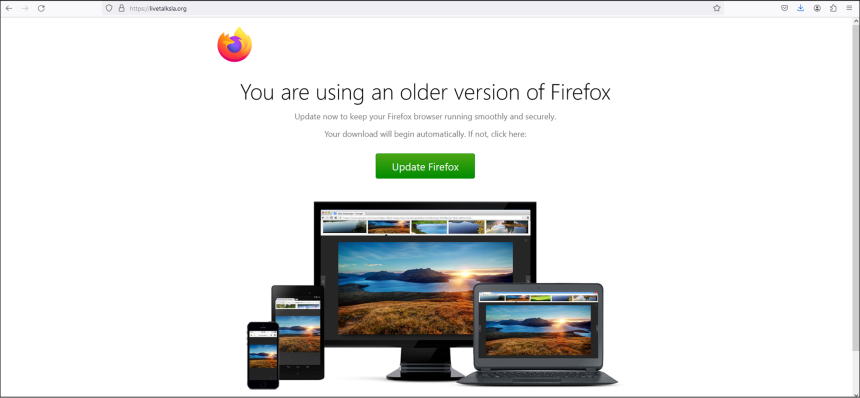
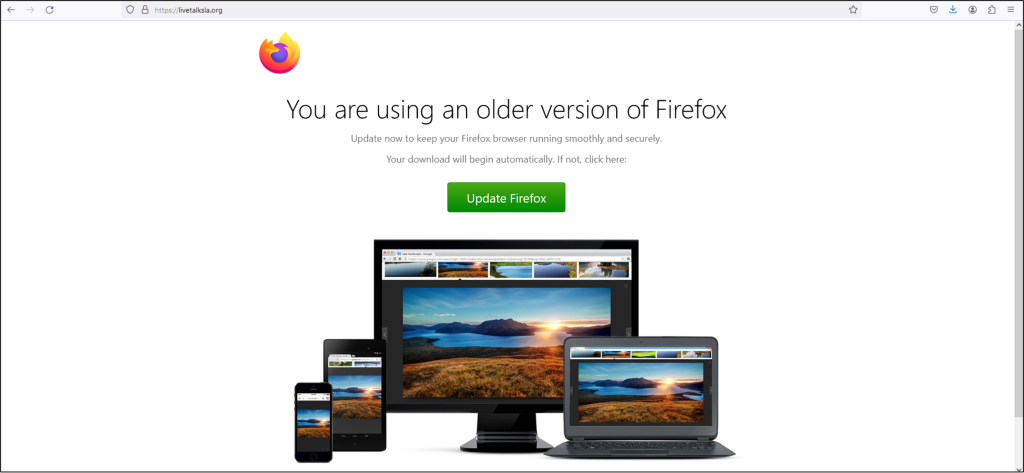
An update message displayed within a web page deserves independent verification, even if it uses familiar browser logos.

The Center for Internet Security has documented campaigns using fake browser updates to deliver SocGholish and other malware. Attackers can also abuse compromised legitimate websites, so recognizing the website does not automatically make its instructions trustworthy.

Close the message and check for updates through your browser’s own settings. That gives you a separate way to verify the claim.

2. Fake browser update scams ask you to run commands

Stop if a web page asks you to open Run, PowerShell, Command Prompt, or Terminal and paste something.

Microsoft has observed ClickFix pages copying malicious commands to the clipboard while presenting apparently helpful instructions. The danger comes when the user executes that command. A verification or repair message can therefore become the entry point for malware.

You do not need to test the command to decide whether it is suspicious.

3. A verification check leaves the browser

Real attack screenshot published by Microsoft Threat Intelligence.

A checkbox asking whether you are human may look routine. Instructions to launch Windows tools and execute pasted text are a different matter.

Microsoft has documented malicious pages impersonating Cloudflare verification screens. Familiar branding can make the request feel normal, but the requested action is the important clue.

If a website cannot continue without you running a system command, leave the page.

4. The message pressures you to skip checks

Treat urgency as a reason to slow down. A warning might claim that your browser is unsafe, a document cannot open, or access will remain blocked until you complete a repair.

Those claims are easy to display on a web page. Check them through an independent route:

  • Open the browser settings yourself.
  • Visit the software developer’s official website.
  • Contact your IT team through a known channel.
  • Avoid calling a support number supplied only by the warning.

A convincing design should never replace verification.

5. The page offers an unexpected update file

An unsolicited download is another warning sign. CIS researchers documented a malicious remote-access package distributed in an archive named update.zip. A reassuring filename does not establish what a file actually contains.

Do not open a file simply because a web page says an update is required.

How to update Chrome safely

On a computer, open Chrome’s menu and select Help > About Google Chrome. Allow Chrome to check for updates, then relaunch it if prompted. Google explains that Chrome normally updates automatically, although a restart may be needed to finish applying an update.

What to do if you followed the instructions

Close it if you only saw the page. If a file downloaded, avoid opening it.

If you executed a command or installer, treat the incident as a possible compromise. On a work device, notify IT immediately and explain exactly what you did. On a personal computer, seek trusted security assistance and scan for malware. Avoid entering more sensitive information on the device until it has been checked.

Keep the page address and the approximate time of the incident. Those details can help someone investigate what happened.


TAGGED:Browser SecurityBrowser update scamsFake browser update

Sign Up For Daily Newsletter

Be keep up! Get the latest breaking news delivered straight to your inbox.
By signing up, you agree to our Terms of Use and acknowledge the data practices in our Privacy Policy. You may unsubscribe at any time.
Share This Article
Facebook Copy Link Print
Previous Article secured-email-featured-pcbuglab How to secure your email account: 7 essential steps
Next Article windows-registry-pcbuglab How to back up and restore Windows Registry
Leave a review

Leave a Review Cancel reply

Your email address will not be published. Required fields are marked *

Please select a rating!

FacebookLike
InstagramFollow

Subscribe Now

Subscribe to our newsletter to get our newest articles instantly!
Most Popular
gta6-cyberleek-pcbuglab
Cyberleek claims GTA 6 Xbox leak playable for PC
November 23, 2026
windows-error-0x80080005-pcbuglab
How to fix Windows Update error 0x80080005
November 18, 2026
update-service-disabled-featured-pcbuglab
How to fix Windows error 0x80070422
November 11, 2026
Windows Update error 0x80240034 download failure illustration-pcbuglab
How to fix Windows error 0x80240034
November 11, 2026
Windows error 0x8024402c - pcbuglab
How to fix Windows error 0x8024402c
November 11, 2026

You Might Also Like

Chrome-extension-search-hijacking-pcbuglab
Cybersecurity

Chrome extension search hijacking: what you need to know now

4 Min Read
Chinese hackers launch ARTEX AI attacks-pcbuglab
Cybersecurity

Chinese hackers launch ARTEX AI attacks on 200+ organizations

3 Min Read
hackers-overheat-french-supermarket-fridges-pcbuglab
Cybersecurity

French supermarket cyberattack turns freezers Into heaters

5 Min Read
cybersecurity-featured-pcbuglab
Cybersecurity

How to spot phishing emails and protect your accounts

4 Min Read

Always Stay Up to Date

Subscribe to our newsletter to get our newest articles instantly!
PCBugLab PCBugLab

Clear solutions for everyday PC problems. Explore troubleshooting guides, hardware advice, and practical insights to get more from your technology.

Explore

  • Home
  • Cybersecurity
  • Tech news
  • How-to guides
  • Hardware

Have a Question or Suggestion?

Tell us which PC problems or tech topics you’d like us to cover. Your feedback helps shape our next guides.
Contact Us
Welcome Back!

Sign in to your account

Username or Email Address
Password

Lost your password?